
Quick save · key takeaways
- Bazzite DX is standard Bazzite plus developer tooling built into the image.
- QEMU and ROCm moved from regular images into DX with Bazzite 44.
- You switch by rebasing an installed Bazzite system, not from a separate ISO.
- Rolling back to standard Bazzite keeps your files and Steam library.
Bazzite is built for playing games, but plenty of the people who play games also write software, build mods, run home-lab services or make games of their own. For them, the standard image is a good start and slightly short of a workstation. Bazzite DX, short for Developer Experience, closes that gap. It is the same Bazzite, with the same kernel, Steam integration and handheld support, plus a set of developer tools baked into the image. This guide explains what Bazzite DX includes, how it differs from adding tools yourself, how to switch to it, and when it is the wrong choice.
What Bazzite DX is
Bazzite DX is a variant image maintained in the Universal Blue organisation alongside Bazzite itself. It follows the pattern of Bluefin DX and Aurora DX, the developer editions of Universal Blue's workstation images: start from the consumer image, then add tooling that developers would otherwise install by hand on every machine.
The project began as an alpha in 2024 and matured through 2025 and 2026. Two milestones in 2026 made it a more serious option. First, with Bazzite 44 the team moved QEMU and ROCm out of the regular images and into DX, trimming roughly a gigabyte from the standard download while keeping those tools available for people who need them. Second, by mid-2026 DX was rebuilt on the Fedora 44 base and produced in lockstep with the stable Bazzite images, so DX users no longer trail behind regular releases.
A sister project, sometimes referred to as Bazzite GDX, targets game developers specifically, adding tools such as the Godot engine. It has historically been more experimental than DX; check its repository for its current status before relying on it.
What Bazzite DX adds
The precise package list evolves with each release, so treat the repository as the authoritative source. In broad terms, DX layers four groups of tools on top of standard Bazzite.
Container engines
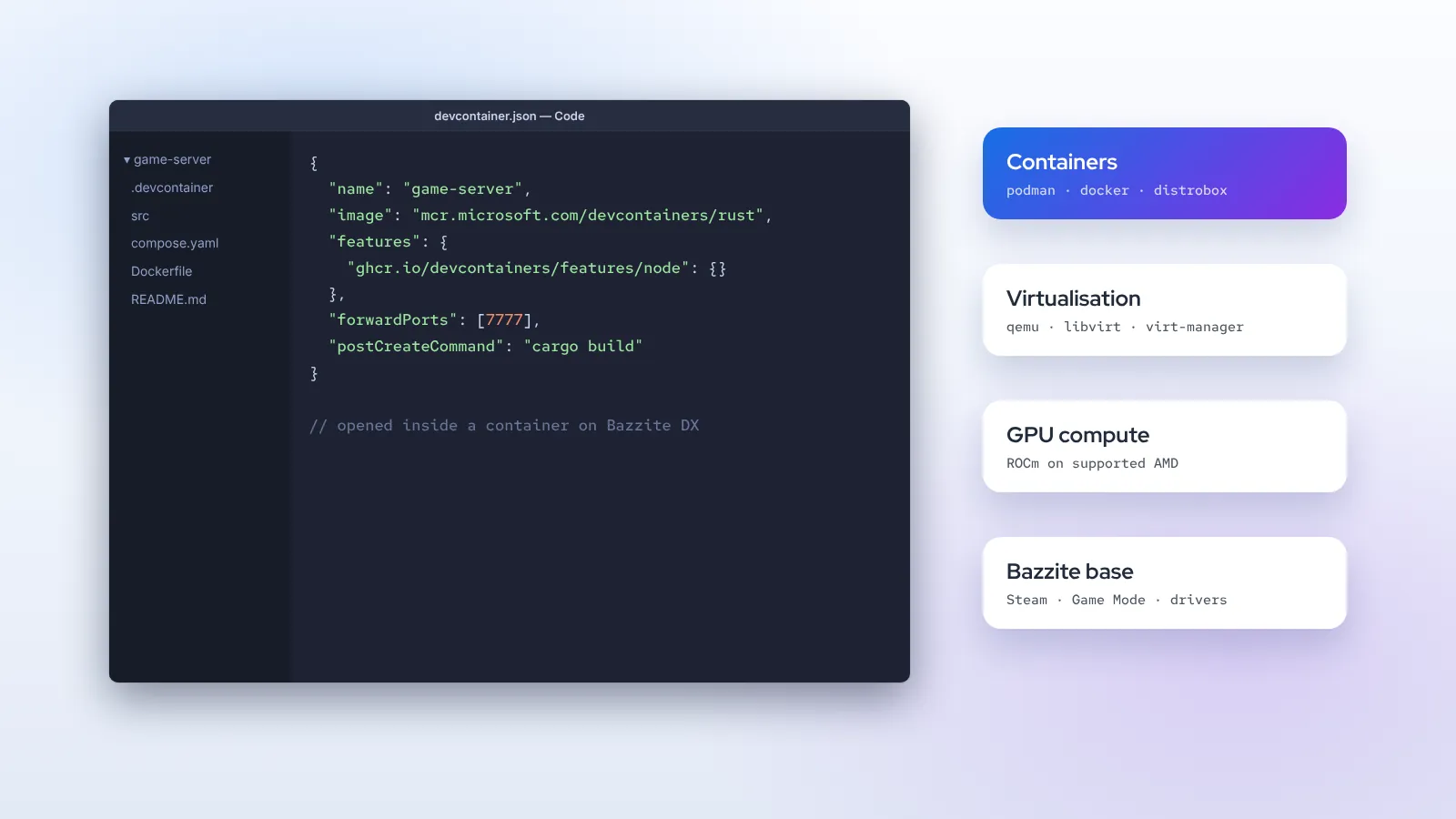
Standard Bazzite already ships Podman and Distrobox. DX adds the Docker engine and its compose tooling for projects whose scripts, CI configuration or teammates assume Docker. It also prepares the system for devcontainers, the specification many editors use to open a project inside a defined container with all its dependencies. On an atomic system this is the cleanest way to develop: your toolchains live in containers you can delete and recreate, and the host stays untouched.
Virtualisation
QEMU, libvirt and a graphical manager for virtual machines come built in. That covers testing other Linux distributions, running a Windows virtual machine for software that has no Linux build, or reproducing a server environment locally. On hardware that supports it, IOMMU-based device passthrough is possible, although setting it up remains an advanced, machine-specific job.
GPU compute
ROCm, AMD's compute platform, moved into DX with the Bazzite 44 release. On supported Radeon GPUs it enables GPU-accelerated machine learning frameworks, Blender rendering and other compute workloads. Support depends on the card; AMD's own ROCm compatibility list is the reference. NVIDIA users rely on CUDA from the NVIDIA image and containers, which works independently of DX.
Editor and command-line tools
DX images include a code editor set up for container-based development, along with common command-line utilities. Language toolchains themselves are deliberately not baked in: you get them per project through devcontainers, Distrobox or Homebrew, so different projects can use different versions without conflict.
Why a separate image instead of installing tools yourself?
On a traditional distribution you would just install Docker and a hypervisor with the package manager. On Bazzite the base system is read-only, and your options for system-level software are more limited:
- Flatpak suits graphical applications but not daemons such as Docker or libvirt, which need system privileges and services.
- Homebrew installs command-line tools in your home folder but cannot provide kernel-integrated services either.
- Layering RPMs with
rpm-ostree installworks, but every layered package must be reapplied on each update. Large layers slow updates down and can block them entirely when a dependency conflicts with a new base image.
DX solves this by moving those packages into the image itself. They are built and tested together with each release, updated automatically, and rolled back with everything else if something goes wrong. You get a developer workstation that keeps the atomic guarantees of the gaming image.
Who should use Bazzite DX
DX is a good fit if you recognise yourself in any of these descriptions:
- You use one PC for gaming in the evening and programming during the day, and you want both to work without compromise.
- Your projects already use Docker, docker compose or devcontainers.
- You run virtual machines regularly, whether for testing, security work or Windows-only software.
- You train or run machine-learning models on a Radeon GPU and want ROCm without wrestling with installation.
- You build mods, tools or games and want the engine, the game and the debugger on the same machine.
It is probably not the right choice if your device is a handheld you mainly use in Game Mode, if storage is tight, or if your development needs are light enough that a couple of Distrobox containers already cover them. In those cases the standard image plus Distrobox and Homebrew keeps things leaner.
How to switch to Bazzite DX
Bazzite DX is installed by rebasing an existing Bazzite system rather than from its own ISO. Install the regular Bazzite image that matches your hardware first, update it, then rebase to the DX image of the same family.
Using Bazzite Portal
Bazzite Portal's Manage Bazzite section includes a rebase action that lists available images, which is the friendliest way to switch. Choose the DX image that matches your GPU and desktop, confirm, and reboot when it finishes.
Using the terminal
From a terminal, a rebase to the signed DX image looks like this:
rpm-ostree rebase ostree-image-signed:docker://ghcr.io/ublue-os/bazzite-dx:stable
systemctl reboot
Variants exist for GNOME and for NVIDIA hardware; use the image name for your combination as listed in the Bazzite DX repository. After the reboot, check the result:
rpm-ostree statusThe booted deployment should show the DX image. Your previous Bazzite deployment remains available as a rollback target.
Post-switch setup
Some tools need your user account to belong to specific groups, for example to use Docker without sudo or to manage virtual machines. Universal Blue developer images provide ujust recipes for this kind of setup. Run ujust on its own to see the list of available recipes, then follow the one for developer groups or Docker setup. Log out and back in afterwards so the new group membership takes effect.
A practical DX workflow
Here is how a typical project feels on Bazzite DX.
- Clone the project into your home folder. Homebrew provides
gitextras and the GitHub CLI if you want them. - Open it in the editor. If the repository has a
.devcontainerfolder, the editor offers to reopen it inside the container. Dependencies install in the container, not on the host. - Run services with compose. Databases, caches and back-end services start from a compose file, isolated from each other and from your games.
- Test across systems in VMs. If you need to check a build on another distribution or on Windows, the virtual machine manager is already there.
- Switch to play. Close the editor, launch Steam, or on a deck image switch to Game Mode. The development containers keep their state for next time.
Because nothing was installed onto the host, an update to the base image cannot break your toolchain, and a broken toolchain cannot break your games. If a project's container gets into a bad state, delete it and rebuild it from its definition.
Bazzite DX for game and mod development
Game developers have a particular reason to like this setup. You can run the engine, a native Linux build of your game and the Windows build through Proton on the same machine, which is a quick way to test how your game behaves on Steam Deck-class hardware and Linux in general. The Steam Deck runs on the same software foundations Bazzite uses for its Game Mode, so problems that appear under gamescope on your desktop are a good early warning.
Godot and Blender are available as Flatpaks; heavier engines and asset pipelines can run natively or in containers depending on their Linux support. For modding, keeping each game's tools in a dedicated Distrobox prevents one mod manager's dependencies from interfering with another's.
Caveats and limits
- Larger downloads. DX images are bigger than standard Bazzite because they include the extra tooling. Updates take correspondingly longer.
- Kernel-dependent tools. Anything that needs custom kernel modules still has to fit the image model. Virtualisation and containers are covered; unusual drivers may not be.
- Anti-cheat and virtual machines. Some games detect virtualisation tools or the kernel options used for passthrough. If an online game behaves strangely after you enable advanced virtualisation, that is a likely cause.
- Testing status. DX now builds alongside stable Bazzite, but it has a smaller user base. Report issues on its repository rather than on the main Bazzite tracker.
Going back to standard Bazzite
Changed your mind? Rebase back to the regular image with the same command, using the standard image name:
rpm-ostree rebase ostree-image-signed:docker://ghcr.io/ublue-os/bazzite:stable
systemctl reboot
Your home folder, Flatpaks and Steam library are unaffected. Containers you created with Podman remain; Docker data stays on disk but the Docker engine will no longer be present until you rebase to DX again.
DX compared with the alternatives
It is worth weighing DX against the other ways of adding developer tools to Bazzite, because each has a place.
| Approach | Good for | Trade-off |
|---|---|---|
| Standard Bazzite + Distrobox | Language toolchains, light scripting, occasional builds | No Docker daemon or hypervisor on the host |
| Standard Bazzite + Homebrew | Command-line utilities and CLIs | Cannot provide system services |
| Layering RPMs with rpm-ostree | One or two small packages with no alternative | Slower updates, possible conflicts on new bases |
| Bazzite DX | Docker, devcontainers, VMs and GPU compute as daily tools | Larger image, smaller user base |
A useful rule of thumb: if you find yourself layering Docker or libvirt onto standard Bazzite, you are rebuilding DX by hand and taking on the maintenance yourself. Switch to the image instead.
Security considerations
Developer tools widen what a machine can do, and that deserves a moment's thought. Membership of the docker group is effectively root access, so only add accounts you trust. Containers pulled from public registries run whatever their authors put in them; prefer official images and pin versions in your compose files. Virtual machines with device passthrough have direct access to that hardware. None of this is unique to Bazzite, but on a gaming PC that may be shared with family it is worth keeping development accounts separate from everyday ones.
Summary
Bazzite DX is Bazzite plus a developer workstation: Docker alongside Podman, devcontainer support, virtualisation and ROCm compute, all delivered inside the image so they update and roll back with the rest of the system. You get there by installing regular Bazzite and rebasing, either through Bazzite Portal or with rpm-ostree rebase. If you write code or build games on the same machine you play on, it is the most comfortable way to keep both worlds tidy.
Not sure which base image to start from? Use the finder on our homepage, or read what Bazzite is based on to understand how the image layers fit together.
Frequently asked questions
Is Bazzite DX free?
Yes. Like Bazzite, it is free and its build recipes are open source.
Can I install Bazzite DX directly from an ISO?
The usual route is to install regular Bazzite and rebase to DX. Check the Bazzite DX repository for any dedicated installer images, which may be offered from time to time.
Does Bazzite DX reduce gaming performance?
Not by itself. The gaming stack is identical. Background services you start yourself, such as virtual machines or containers, use resources like they would on any system.
Is Bazzite DX available for handhelds?
DX is aimed primarily at desktop images. A handheld used mainly in Game Mode gains little from it; Distrobox on the standard deck image is usually enough for light development.